Findra: Windows Search.
But it works.
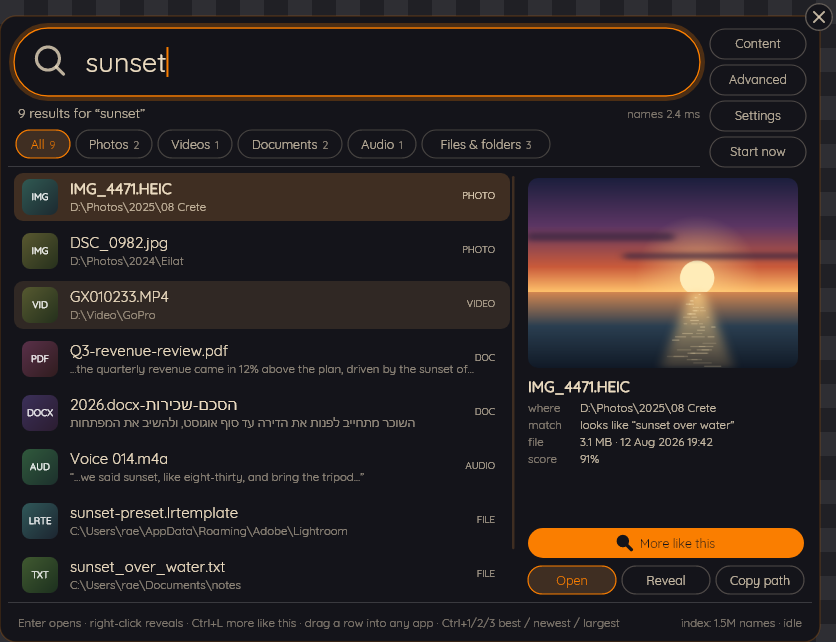
Type one word. Findra gives you the photo that looks like it, the document that says it and the recording where somebody said it - and not one of them has it in the filename.
Findra is a free, open-source desktop search program for Windows 10 and 11. It finds files by name from an index held in RAM, in 2.13 to 3.77 ms median across five measured queries, and - if you turn it on - by the words inside documents, by what a photograph shows, and by what was said in a recording. Everything runs on your own machine.
We fixed Windows Search.
You're welcome.
You bought a drive that reads seven thousand megabytes a second. Windows uses it to think about your question for four minutes, freeze a folder you were not looking in, find nothing, and then gently suggest that the internet might know where you keep your own tax return.
Findra holds the file table in RAM and answers before your finger comes off Enter. A median of 2.13 ms for "invoice", measured, on a disk with 1.34 million files on it. The slowest of the five medians was 3.77 ms.
How fast is Findra?
Measured with findra --searchbench,
which you can run on your own machine to get your own.
Under 4 ms.
"This is insane, and crazy fast! I can absolutely see myself replacing Windows' crappy search with it."
Get Findra
Download the installer from the
releases page, which
carries one for x64 and one for arm64. That is the whole install of
Findra 0.9.0, released on 30 September 2026.
Or run
winget install blakazulu.Findra,
which installs the same program from the Windows Package Manager catalogue; the catalogue
can take a few days to pick up a new release. Building from source
still works and needs the .NET 10 SDK and nothing else. Every release note is that
version's section of the
changelog.
Microsoft Store
Findra is listed in the Microsoft Store. Store packages receive their updates through the Store; the Store release can differ from the latest GitHub release.
Installer and winget
The installer and winget install the same program, on x64 and arm64 alike. Every release carries an installer for each architecture on its releases page, and winget picks it up from there.
winget installs from the Windows Package Manager catalogue, which can take a few days to pick up a new release; the releases page always has the newest. Neither the installer nor the executables are signed yet, so Windows will warn about an unknown publisher until that changes. The Code signing policy says who writes Findra, who approves a release and who signs it, and it will say what the signature is when there is one.
Uninstalling, and building it yourself
How to remove Findra and what it keeps, and the four commands that build it from source with the .NET 10 SDK.
Install, uninstall and build